SEO has fundamentally changed. In 2026, ranking on Google is just half the battle. Your content now needs to appear in AI Overviews, ChatGPT responses, and Perplexity citations.
The best SEO tools help you win in both traditional search and AI-powered discovery. The wrong ones leave you optimizing for a search landscape that no longer exists.
This guide covers 27 SEO tools I’ve tested across real client projects. You’ll find options for keyword research, technical audits, content optimization, and the emerging field of Generative Engine Optimization (GEO).
Key Takeaways
- All-in-one platforms like Semrush and Ahrefs remain essential for comprehensive SEO management
- AI visibility tracking is now a must-have feature as ChatGPT and Perplexity reshape search behavior
- Free tools like Google Search Console still deliver unmatched first-party data
- Content optimization tools like Surfer SEO and Clearscope help you match search intent at scale
- The best tool stack combines traditional SEO platforms with new GEO-focused solutions
What Are SEO Tools and Why Do They Matter in 2026?

SEO tools are software platforms that help you understand, measure, and improve how your website performs in search results.
They show which keywords drive traffic, what competitors are doing right, and where your site needs improvement.
In 2026, these tools serve a broader purpose. Search engines now include AI-generated summaries, and chatbots like ChatGPT pull information from websites to answer user questions directly.
The new challenge: Your content must rank in traditional results AND get cited in AI-generated answers.
This means modern SEO tools need to track performance across multiple platforms. They should help you optimize for Google’s algorithm while also improving your visibility in AI Overviews, Perplexity, Claude, and ChatGPT responses.
How I Evaluated These SEO Tools
Every tool in this guide earned its spot through actual use on client projects. I didn’t just read feature lists or watch demos.
My evaluation criteria:
- Data accuracy compared to Google Search Console and Analytics
- Ease of use for teams of varying skill levels
- Value for money across different budget ranges
- AI and GEO capabilities for modern search optimization
- Integration options with other marketing tools
All-in-One SEO Platforms
These comprehensive platforms handle keyword research, site audits, rank tracking, and backlink analysis from a single dashboard. They’re the foundation most SEO professionals build their workflow around.
1. Semrush
Semrush began as a keyword research tool in 2008 and has since evolved into one of the most comprehensive SEO platforms available.
What makes it stand out: The competitor analysis capabilities are exceptional. You can see exactly which keywords drive traffic to competitor sites, what they spend on ads, and which content performs best.
The 2026 updates added Enterprise AIO for tracking brand mentions across ChatGPT, Gemini, Perplexity, and Claude. This tracks sentiment and share of voice in AI responses.
For smaller teams, the AI SEO Toolkit monitors visibility across AI platforms without the enterprise price tag.
| Feature | Capability |
|---|---|
| Keyword Database | 25+ billion keywords |
| Site Audit | 140+ technical checks |
| AI Tracking | ChatGPT, Gemini, Perplexity |
| Backlink Index | 43 trillion backlinks |
Pricing: Starts at $165.17/month
Best for: Agencies and marketing teams needing comprehensive competitive intelligence
2. Ahrefs
Ahrefs runs one of the world’s largest web crawlers, second only to Google. This means their backlink and keyword data is exceptionally fresh.
The standout feature is Site Explorer. You plug in any domain and instantly see their organic traffic estimates, top-performing pages, and complete backlink profile.
I use Link Intersect constantly. It shows which sites link to your competitors but not to you. That list becomes your outreach priority.
The Content Gap tool reveals keywords competitors rank for that you’re missing entirely. It’s the fastest way to identify content opportunities.
Pro tip: Ahrefs’ Traffic Potential metric is more reliable than raw search volume. It estimates actual clicks you might receive, accounting for SERP features that steal clicks.
Pricing: Starts at $129/month
Best for: SEO professionals focused on backlink strategy and competitive research
3. SE Ranking
SE Ranking offers the best value for agencies managing multiple clients. The platform includes rank tracking, site audits, and competitor analysis, priced significantly lower than Semrush or Ahrefs.
Local SEO is where SE Ranking shines. You can track rankings at the zip code level, monitor Google Business Profile performance, and manage reviews across locations.
The platform also tracks rankings across AI Overviews, which many competitors still don’t support.
Pricing: Starts at $52/month
Best for: Agencies and small businesses focused on local SEO
Best Keyword Research Tools
Keyword research forms the foundation of every SEO strategy. These tools help you find what your audience searches for and identify opportunities your competitors miss.
4. Mangools (KWFinder)
Mangools built the most beginner-friendly keyword research interface I’ve used. The difficulty scores are intuitive, and the SERP analysis appears alongside every keyword.
KWFinder excels at finding low-competition long-tail keywords. Enter a seed term and it generates hundreds of variations with accurate difficulty estimates.
SERPChecker shows 45+ metrics for the top results on any keyword. You can quickly assess whether a keyword is realistically winnable.
| Tool | Function |
|---|---|
| KWFinder | Keyword research with difficulty scoring |
| SERPChecker | SERP analysis and competitor metrics |
| SERPWatcher | Daily rank tracking |
| LinkMiner | Backlink analysis |
Pricing: Starts at $27.24/month
Best for: Bloggers and small businesses starting with SEO
5. AnswerThePublic
AnswerThePublic visualizes what people actually ask about any topic. It scrapes autocomplete data and displays it in a wheel format, organized by question words.
The tool excels at content ideation. Enter “gut health,” and you’ll get hundreds of real questions: “what is gut health,” “how to improve gut health fast,” “why is gut health important.”
These become your H2 headings, FAQ sections, and content cluster topics.
Pricing: Free version available; paid plans start at $5/month
Best for: Content creators planning topic clusters and blog calendars
6. Google Keyword Planner
Google Keyword Planner remains the only free tool with search volume data directly from Google. The numbers are as accurate as you’ll find anywhere.
The CPC data reveals commercial intent. High suggested bids indicate keywords where advertisers pay real money, suggesting the traffic converts.
Filter by location and language to see how search behavior varies across markets.
Pricing: Free (requires Google Ads account)
Best for: Everyone—it’s free and accurate
Best Content Optimization Tools
Writing great content isn’t enough. These tools help you structure and optimize articles to match what Google rewards with top rankings.
7. Surfer SEO
Surfer analyzes top-ranking pages for any keyword and provides specific recommendations for your content. It tracks word count, headings, keyword usage, and NLP terms.
The Content Editor gives writers a clear checklist. You see a real-time content score that improves as you add recommended elements.
Content Audit identifies existing pages that need improvement. It flags missing terms, thin sections, and internal linking opportunities.
For scaling content production, Surfer AI generates first drafts aligned with SERP patterns. They require editing, but the structure and entity coverage is solid.
73% of pages ranking in the top 3 cover semantic terms that Surfer identifies. The tool essentially reverse-engineers what Google rewards.
Pricing: Starts at $79/month
Best for: Content teams and agencies producing at scale
8. Clearscope
Clearscope focuses purely on content quality. It uses semantic analysis to identify the terms, topics, and questions that comprehensive content should cover.
The content grade system is straightforward. You write in the editor, and Clearscope scores your content based on topical coverage. A++ content typically ranks well.
The trending keyword feature flags terms gaining search momentum. This helps you update content before competitors notice the shift.
Pricing: Starts at $129/month
Best for: Enterprise teams prioritizing content quality over quantity
Best SEO Tools For Technical Optimization
Technical SEO ensures search engines can crawl, understand, and index your site properly. These tools identify issues that silently hurt your rankings.
9. Screaming Frog SEO Spider
Screaming Frog crawls your entire site like Googlebot would. It identifies broken links, redirect chains, duplicate content, missing metadata, and hundreds of other technical issues.
The Chromium rendering mode handles JavaScript-heavy sites. You can verify that React, Vue, or Angular content actually appears to search engines.
I use the custom extraction feature to scrape specific data across sites. Need all product prices from 5,000 pages? Screaming Frog handles it with XPath or regex.
The redirect mapping is essential during migrations. Upload your old URLs and new URLs, then identify chains, loops, and missing redirects before going live.
| Issue Type | Detection Method |
|---|---|
| Broken links | Full site crawl |
| Duplicate content | Hash comparison |
| Missing metadata | Template detection |
| Redirect chains | Multi-hop analysis |
| Orphan pages | Link graph mapping |
Pricing: Free up to 500 URLs; £259/year unlimited
Best for: Technical SEO specialists and development teams
10. Sitebulb
Sitebulb presents technical audit data through visual graphs and charts. The crawl maps show site structure in ways that spreadsheets never could.
The priority hints guide your work. Instead of overwhelming you with every issue, Sitebulb ranks problems by actual SEO impact.
Core Web Vitals reporting connects performance issues to specific URLs that need attention.
Pricing: Starts at £13.50/month
Best for: Agencies presenting technical findings to clients
11. Google Search Console
Every website needs Google Search Console. It’s free, accurate, and provides data no other tool can access.
Performance reports show actual Google data: clicks, impressions, CTR, and average position for every query and page.
The Page Indexing report identifies crawling and indexing issues. If Google can’t access your pages properly, this shows you exactly why.
Security issues and manual actions appear here too. GSC serves as an early warning system for penalties.
Pricing: Free
Best for: Everyone with a website
Best Backlink Analysis Tools
Backlinks remain one of the strongest ranking factors. These tools help you understand your link profile and find new opportunities.
12. Majestic
Majestic invented Trust Flow and Citation Flow, two metrics that evaluate link quality. Trust Flow measures the trustworthiness of linking sites based on their own inbound links.
Topical Trust Flow shows which categories your backlink profile is strongest in. If you run a legal site but most links come from unrelated niches, that’s a problem.
The historical index goes back years. You can see how any domain’s link profile evolved over time.
Pricing: Starts at $49.99/month
Best for: Link builders focused on quality metrics
13. BuzzSumo
BuzzSumo shows which content gets shared and linked across the web. Enter any topic and see the most viral pieces from the past week, month, or year.
For link building, the strategy is simple: find content that attracted hundreds of backlinks, then create something better.
The journalist database helps with digital PR. You can find writers covering your topics, see their recent articles, and craft relevant pitches.
Brand monitoring alerts you when your company or competitors are mentioned. Unlinked mentions become easy outreach targets.
Pricing: Starts at $199/month
Best for: Content marketers and digital PR teams
Best Rank Tracking Tools
Tracking keyword positions shows whether your SEO efforts actually work. These tools monitor rankings across search engines, devices, and locations.
14. Nightwatch
Nightwatch offers the most accurate local rank tracking I’ve tested. You can track positions at the zip code level across 190,000+ locations.
The multi-platform support covers Google, Bing, and YouTube rankings. Most trackers ignore the latter two.
Built-in cannibalization detection alerts you when multiple pages compete for the same keyword. This helps consolidate content before rankings drop.
Pricing: Starts at $32/month for 250 keywords
Best for: Local businesses and agencies managing regional campaigns
15. Google Analytics 4
GA4 replaced Universal Analytics and tracks user behavior across websites and apps. For SEO, it shows how organic traffic converts into leads or sales.
Connect GA4 with Search Console to see the complete journey: from search query to site visit to conversion.
AI traffic tracking requires a custom setup, but you can segment visitors from ChatGPT, Perplexity, and other AI referrers.
Pricing: Free (paid tier starts at $50,000/year)
Best for: Every website owner
16. Microsoft Clarity
Clarity is a free session recording and heatmap tool from Microsoft. It shows exactly how users interact with your pages.
For SEO, behavior data reveals problems: pages with high scroll abandonment might need better structure, while high rage-click areas suggest UX issues.
The integration with GA4 lets you segment recordings by traffic source. Watch how organic visitors specifically behave on your site.
Pricing: Free
Best for: Understanding user behavior on landing pages
AI and GEO (Generative Engine Optimization) Tools
Traditional SEO isn’t enough anymore. These tools help you appear in AI-generated answers across ChatGPT, Perplexity, Gemini, and Google’s AI Overviews.
17. LLMrefs
LLMrefs pioneered Generative Engine Optimization (GEO) tracking. It monitors where your brand appears in AI chatbot responses.
The keyword-based approach tracks how different prompts trigger citations of your content. You see which topics you own and which competitors dominate.
Sentiment analysis shows whether AI mentions are positive, negative, or neutral. This matters because users trust AI summaries.
AI Overviews now appear on 84% of search queries. If you’re not tracking AI visibility, you’re missing most of modern search.
Best for: Enterprise brands tracking AI brand presence
18. ChatGPT
ChatGPT itself serves as an SEO research tool. Use it for content ideation, keyword clustering, and writing optimization.
Effective prompts for SEO work:
- “Generate 50 long-tail variations for [seed keyword]”
- “Create an outline covering all topics someone researching [topic] would need”
- “What questions would someone ask before buying [product]?”
The output needs validation against actual SEO data, but it significantly accelerates brainstorming.
Pricing: Free tier available; Plus is $20/month
Best for: Content ideation and research acceleration
19. Claude
Claude handles longer documents better than ChatGPT, making it excellent for content audits and rewrites.
Paste an entire article and ask: “What topics are missing that top-ranking pages would cover?” The responses are surprisingly accurate.
Claude can also analyze competitor content at scale. Feed it several top-ranking articles and ask for patterns in structure, depth, and topic coverage.
Pricing: Free tier available; Pro is $20/month
Best for: Long-form content analysis and improvement
Best Local SEO Tools
Local businesses need specialized tools to manage Google Business Profiles, track map pack rankings, and maintain NAP consistency.
20. BrightLocal
BrightLocal covers everything local businesses need: rank tracking, citation building, review management, and GBP auditing.
The local rank tracker shows positions across the entire map grid, not just city-center rankings. This reveals where you’re visible and where you’re invisible.
Citation Tracker finds inconsistent business listings across the web. NAP consistency directly impacts local rankings.
Pricing: Starts at $39/month
Best for: Local businesses and agencies managing multi-location clients
Best WordPress SEO Plugins
WordPress powers over 40% of websites. These plugins add essential SEO functionality to the CMS.
21. Rank Math
Rank Math replaced Yoast as the most popular free WordPress SEO plugin. It includes features that Yoast only offers in paid tiers.
Built-in schema markup works without code. Select your page type and Rank Math generates proper structured data.
The redirect manager handles 404 errors without additional plugins. The setup wizard configures everything for beginners.
Pricing: Free; Pro starts at $59/year
Best for: WordPress users wanting comprehensive free SEO features
22. Yoast SEO
Yoast pioneered WordPress SEO and remains a solid choice. The content analysis gives writers clear feedback on readability and keyword usage.
XML sitemaps generate automatically. The plugin keeps them updated as you publish new content.
The premium version adds redirect management, internal linking suggestions, and multiple focus keywords per post.
Pricing: Free; Premium is $99/year
Best for: WordPress users preferring established, well-documented plugins
Best Free SEO Tools
Budget shouldn’t prevent you from doing SEO. These free tools handle essential tasks without cost.
23. Google Trends
Google Trends shows how search interest changes over time. It reveals seasonal patterns, emerging topics, and declining interest.
Compare up to five terms to see relative popularity. This helps prioritize keywords that are gaining momentum over those losing steam.
Regional data shows where search interest is strongest. Target your content to locations with the most demand.
Pricing: Free
Best for: Trend analysis and content timing
24. Ubersuggest
Neil Patel’s Ubersuggest provides keyword research, site audits, and rank tracking at budget-friendly prices. The free tier allows limited daily searches.
The content ideas feature shows top-performing articles for any keyword. It includes social shares and backlink counts.
Site audits check for technical issues and provide prioritized fix recommendations.
Pricing: Free limited version; paid starts at $29/month
Best for: Beginners and small businesses with limited budgets
25. Bing Webmaster Tools
Bing Webmaster Tools imports your Google Search Console data, so setup takes minutes. It shows how your site performs in Bing search results.
Why this matters in 2026: ChatGPT uses Bing data. Better Bing visibility can improve your chances of appearing in ChatGPT responses.
The SEO reports are often clearer than Google’s, with specific recommendations in plain language.
Pricing: Free
Best for: Everyone who wants better AI search visibility
Specialized SEO Tools
These tools serve specific purposes that broader platforms don’t cover as well.
26. Exploding Topics
Exploding Topics identifies trends before they peak. It scans billions of searches and conversations to spot growing interest early.
For SEO, timing matters. Creating content about emerging topics means less competition and potential first-mover advantage.
Category filters help you find trends relevant to your industry. Weekly reports ensure you don’t miss what’s gaining traction.
Pricing: Starts at $39/month
Best for: Content teams seeking early competitive advantages
27. SpyFu
SpyFu provides 15+ years of historical data on competitor SEO and PPC campaigns. You can see exactly which keywords they’ve targeted over time.
Ad copy history shows every variation competitors have tested. This reveals messaging that resonates with your shared audience.
Unlimited searches across every plan make it ideal for intensive research without limits.
Pricing: Starts at $39/month
Best for: Competitive research and PPC intelligence
How to Choose Your SEO Tool Stack
No single tool does everything well. The best approach combines specialized tools based on your specific needs.
For content-focused SEO: Start with Surfer SEO or Clearscope for optimization, Ahrefs or Semrush for keyword research, and Google Search Console for performance tracking.
For technical SEO: Screaming Frog handles comprehensive audits. Add Google Search Console for indexing issues and Sitebulb for visual reporting to clients.
For local SEO: BrightLocal or SE Ranking covers local rank tracking and citation management. Google Business Profile optimization is essential.
For agency work: Semrush or Ahrefs as your primary platform, Screaming Frog for technical audits, and SE Ranking for affordable rank tracking across many clients.
For AI/GEO optimization: LLMrefs or Semrush Enterprise AIO for tracking, plus strong on-page SEO fundamentals that help your content get cited by AI systems.
Building an Effective SEO Workflow
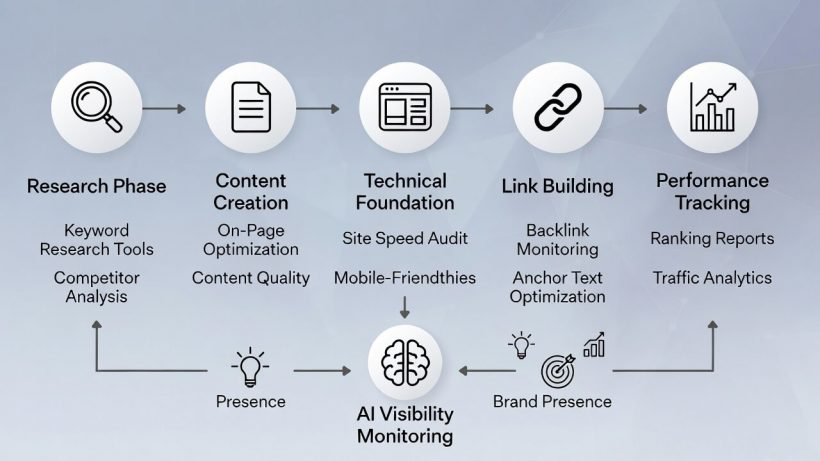
Tools only matter if you use them consistently. Here’s a workflow that leverages the best of what’s available:
1. Research Phase
Use keyword research tools to identify opportunities. Check search volume, difficulty, and intent before committing to topics.
2. Content Creation
Write with content optimization tools open. Follow their recommendations for keyword usage, headings, and topical coverage.
3. Technical Foundation
Run monthly site audits. Fix critical issues immediately and track improvements over time.
4. Link Building
Monitor your backlink profile and your competitors’. Identify outreach opportunities from content that’s already attracting links.
5. Performance Tracking
Track rankings weekly. Connect ranking changes to content updates, link building, or algorithm shifts.
6. AI Visibility Monitoring
Check where your brand appears in AI responses. Optimize content that’s missing from AI summaries but ranking in traditional results.
Frequently Asked Questions
What is the best all-in-one SEO tool in 2026?
Semrush and Ahrefs remain the top choices. Semrush offers broader marketing features, including AI visibility tracking. Ahrefs provides the most accurate backlink and keyword data. Your choice depends on whether competitive intelligence or link research matters more.
Are free SEO tools good enough?
Google Search Console, Google Analytics 4, and Bing Webmaster Tools cover essential monitoring for free. For keyword research and competitive analysis, free tools have significant limitations. Budget $50-100/month minimum for serious SEO work.
How do I track AI search visibility?
Semrush Enterprise AIO and LLMrefs specifically track brand mentions in AI chatbot responses. Google Search Console shows some AI Overview data. This is an emerging area with tools improving rapidly.
Which SEO tool is best for beginners?
Mangools (KWFinder) has the friendliest interface for keyword research. Ubersuggest offers good value with guided recommendations. Start with Google Search Console regardless—it’s free and essential.
How many SEO tools do I need?
Most professionals use 3-5 tools regularly. A typical stack includes one all-in-one platform (Semrush or Ahrefs), Google Search Console, a content optimization tool, and a technical crawler. Add specialized tools as specific needs arise.
Can ChatGPT replace SEO tools?
No. ChatGPT assists with content ideation and optimization but lacks real-time search data. You can’t track rankings, analyze backlinks, or audit technical issues with AI chatbots. Use them as supplements to data-driven SEO tools.
Conclusion
The SEO tools landscape in 2026 requires thinking beyond traditional search rankings. The best strategies combine established platforms like Semrush and Ahrefs with emerging GEO-focused solutions.
Start with the fundamentals. Google Search Console is free and provides invaluable data. Add Screaming Frog for technical audits and one all-in-one platform for competitive research.
Then expand based on your priorities. Content teams benefit from Surfer SEO or Clearscope. Local businesses need BrightLocal or SE Ranking. Enterprises should explore AI visibility tracking.
The tools matter less than how you use them. Consistent auditing, strategic content creation, and ongoing optimization produce results regardless of which specific platforms you choose.
Pick tools that match your budget and workflow. Then actually use them—that’s where the results come from.