Your Google Business Profile (GBP) is often the first thing customers see when they search for your business. If it’s incomplete, outdated, or neglected, you’re handing those customers to your competitors.
Google’s local search algorithm heavily weighs GBP signals. According to Whitespark’s Local Search Ranking Factors report, GBP signals are the top factor for Local Pack and Maps rankings. That makes profile optimization one of the highest-ROI marketing tasks you can do.
This guide covers the practical steps that move the needle.
Key Takeaways
- Complete every profile section, since Google ranks fully filled-out profiles significantly higher than incomplete ones
- Choose the most specific primary category available and add relevant secondary categories
- Respond to every review with detail, not generic one-liners
- Upload fresh photos weekly to signal active business management
- Post updates regularly to keep your profile visible in local results
How Google Ranks Local Profiles
Google uses three core factors to decide which profiles show up in the Local Pack and Maps results:
- Relevance – how well your profile matches the search query. Your categories, description, and services all feed into this.
- Distance – how close your business is to the searcher. You can’t change your location, but you can define service areas precisely.
- Prominence – how well-known your business is online. Reviews, backlinks, consistent business information across directories, and overall web presence all contribute here.
You can directly control relevance and prominence through optimization. Distance is the one factor you can’t influence, which makes the other two even more important.
Setting Up Your Profile the Right Way
If you haven’t claimed your profile yet, go to Google Business Profile and search for your business. Claim an existing listing or create one from scratch. Then verify through video, postcard, phone, or email.
Here’s what to get right from day one:
NAP accuracy. Your Name, Address, and Phone number must match exactly across every platform. Even small differences (like “St.” vs. “Street”) can confuse Google’s algorithm. Audit your local citations and fix mismatches before doing anything else.
Primary category selection. This is the single strongest relevance signal your profile sends. Pick the most specific option available. A bakery should choose “Bakery,” not “Restaurant.” An HVAC repair company should choose “HVAC Contractor,” not “Home Services.”
You can add up to nine secondary categories. Use them for additional services you genuinely offer.
Business description. You get 750 characters. Lead with your most important services and location. Include relevant keywords naturally. Skip the corporate jargon and write like you’re telling a friend what you do.
Hours and attributes. 64% of consumers check profiles specifically for hours. Keep them updated, especially during holidays. Select every attribute that applies to your business, like “wheelchair accessible” or “free Wi-Fi.” These help match your profile to filtered searches.
Profiles with complete information rank dramatically better than partial ones. Fill out every available field.
Reviews: Your Most Powerful Ranking Signal
Reviews do double duty. They boost your rankings, and they convince potential customers to choose you over alternatives.
Ask consistently. Don’t wait for reviews to happen organically. Send follow-up emails with a direct link to your review page. Some businesses display QR codes at checkout.
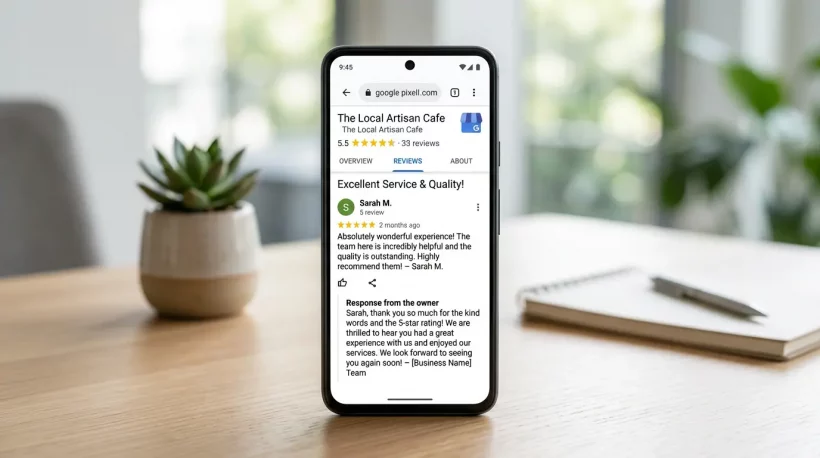
Respond to every review. Generic replies like “Thanks for the review!” don’t help. Write detailed, personalized responses that acknowledge specific feedback. Mention your service or location naturally in your reply. One staffing agency started ranking for “travel nursing agency” simply because that phrase appeared frequently in their customer reviews.
Negative reviews require special attention. Respond within 24 hours, acknowledge the concern, and offer a solution. Potential customers pay more attention to how you handle complaints than to the complaints themselves.
Don’t ignore review velocity. A steady stream of reviews signals an active, healthy business. Ten reviews spread across ten weeks beat ten reviews in one day.
Photos and Visual Content
Visual content directly correlates with ranking position. Businesses in the top Local Pack positions consistently have more photos than those ranked lower.
Upload these essentials:
- Logo and cover photo
- Interior and exterior shots
- Team members working
- Products or services in action
- Behind-the-scenes content
Behind-the-scenes photos often outperform polished stock imagery. A bakery showing flour-covered hands during early morning prep builds more trust than a perfect product shot.
Google recommends 1080×1080 pixel images. Videos can be up to 100MB and 30 seconds. Upload new content weekly. Stale profiles with months-old photos signal an inactive business.
Google Posts and Regular Updates
Google Posts let you share offers, events, updates, and announcements directly on your profile. Think of them as mini social media posts that appear in search results.
Post at least once per week. Include an image and a clear call to action. Event posts with specific dates create urgency and appear prominently in mobile results.
The types that work best:
- Limited-time promotions and seasonal offers
- New product or service launches
- Event announcements
- Company news and milestones
Consistent posting tells Google your business is active. Google says regularly updated profiles get significantly more views than dormant ones.
Products, Services, and Menus
Your Products and Services sections help Google understand exactly what you offer. Add descriptions, pricing, and images for each item. Service-area businesses should define coverage zones precisely by city or radius.
Restaurants should upload menus directly. Google’s AI converts menu photos into searchable text, so people can find your dishes when they search “vegan pasta near me.”
Common Mistakes That Tank Rankings
Keyword stuffing your business name. Adding terms like “Best” or city names violates Google’s guidelines. Use your actual legal business name. Violations lead to suspension.
Ignoring on-page SEO on your website. Your GBP links to your website. If that site is poorly optimized, it drags your profile down, too. Make sure your site’s title tags, content, and meta descriptions are solid.
Letting your profile go stale. No new photos, no posts, no review responses. Google may interpret inactivity as a sign the business isn’t operating.
Inconsistent information. If your phone number on Yelp doesn’t match your GBP, both platforms lose trust signals. Audit your business directory listings regularly.
Tracking What’s Working
Google provides built-in performance insights through your GBP dashboard. The metrics that matter most:
Profile views show your visibility trend. Search queries reveal which keywords trigger your profile. Customer actions (calls, website clicks, direction requests) measure actual conversions.
Most profile interactions happen on mobile devices. Optimize your linked website for mobile first. Check metrics weekly to catch drops early. Sudden declines usually indicate a specific issue, such as a changed phone number or a suspended listing.
Conclusion
Google Business Profile optimization isn’t a one-time project. Treat your profile like a living asset that needs weekly attention: fresh photos, new posts, review responses, and updated information. Businesses that consistently maintain their profiles dominate local search results. Start with the basics, stay consistent, and the rankings will follow.